Streamline Your HELIX Setup with the HCCT Cable Connect Tray
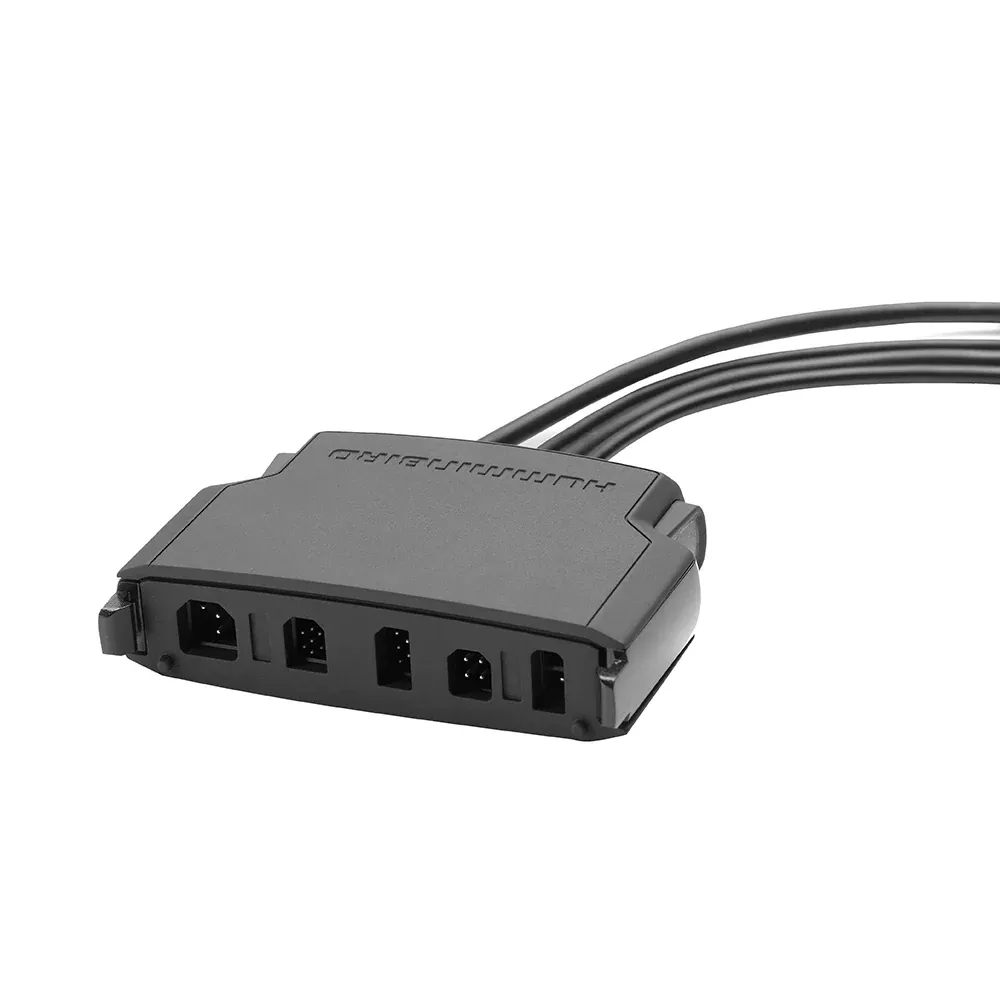
Imagine launching your boat at dawn, ready for a full day on the water, only to fumble with a tangle of cables behind your HELIX fish finder. The Humminbird HCCT Cable Connect Tray eliminates that hassle, transforming chaotic wiring into a neat, secure system. Designed specifically for HELIX series units, this black cable organizer clamps multiple connections into one compact tray, making setup and takedown a breeze—whether you’re rigging for a tournament or stowing gear after a sunset cruise.
Anglers and boaters swear by it for its rugged build that withstands splashes, vibrations, and salt air, keeping power cords, transducers, and networking cables protected and accessible. No more pinched wires or accidental disconnections mid-fishing trip.
Key Benefits for Everyday Boating Adventures
Ultimate Cable Management: Consolidates up to five cable inputs into a single, organized tray, reducing clutter behind your display and preventing wear from constant flexing.
Quick Connect and Disconnect: Snap cables in or out effortlessly, ideal for seasonal storage or swapping units between boats.
Durability on the Water: Crafted from high-impact materials in sleek black to blend with your HELIX console, it shields connections from environmental hazards like moisture and UV exposure.
Factory Replacement Upgrade: Fits seamlessly as a direct swap for stock trays on many HELIX models, often improving accessibility and longevity.
Boaters report saving precious minutes per outing, which adds up over a season of chasing bass or walleye. It’s not just a tray—it’s peace of mind for your electronics investment.
Perfect Fit for HELIX Series Fish Finders
This tray pairs flawlessly with all models in the HELIX 8, 9, 10, and 12 series. Whether you run a compact HELIX 8 for kayak fishing or a powerhouse HELIX 12 on your center console, the HCCT adapts to your setup. It supports essential connections like power, NMEA 2000 networking, Ethernet for multiple units, and sonar transducers, ensuring everything stays aligned and strain-free.
Pro tip: If you’re running MEGA Live imaging or AutoChart Live, this tray keeps those high-bandwidth cables tidy, minimizing signal interference.
Simple Installation: Get Set Up in Minutes
Installing the HCCT is straightforward, even for DIY boaters new to marine electronics. Here’s a quick guide:
Power down your HELIX unit and disconnect all cables.
Remove the factory tray if present (usually just a few screws or clips).
Align the HCCT with your unit’s mounting holes—it’s a drop-in replacement.
Route cables through the designated slots (five outputs for versatility).
Secure with provided hardware and test connections before heading out.
Tools needed: Basic screwdriver set. Total time: Under 15 minutes. For best results, apply dielectric grease to connections for extra corrosion resistance in saltwater environments.
Tips for Long-Lasting Performance
To maximize your HCCT’s lifespan:
Inspect cables quarterly for frays, especially after rough water sessions.
Avoid overtightening screws to prevent cracking the tray.
Pair with cable ties or Velcro wraps for added strain relief on longer runs.
Clean with mild soap and freshwater rinses—never harsh chemicals.
Many users integrate it into full console refits, combining with RAM mounts for a pro-grade helm setup.
Frequently Asked Questions
Is the HCCT Cable Connect Tray compatible with all HELIX models?
Yes, it’s designed for every model in the HELIX 8, 9, 10, and 12 series, serving as a reliable factory replacement or upgrade.